Appearance
Settings
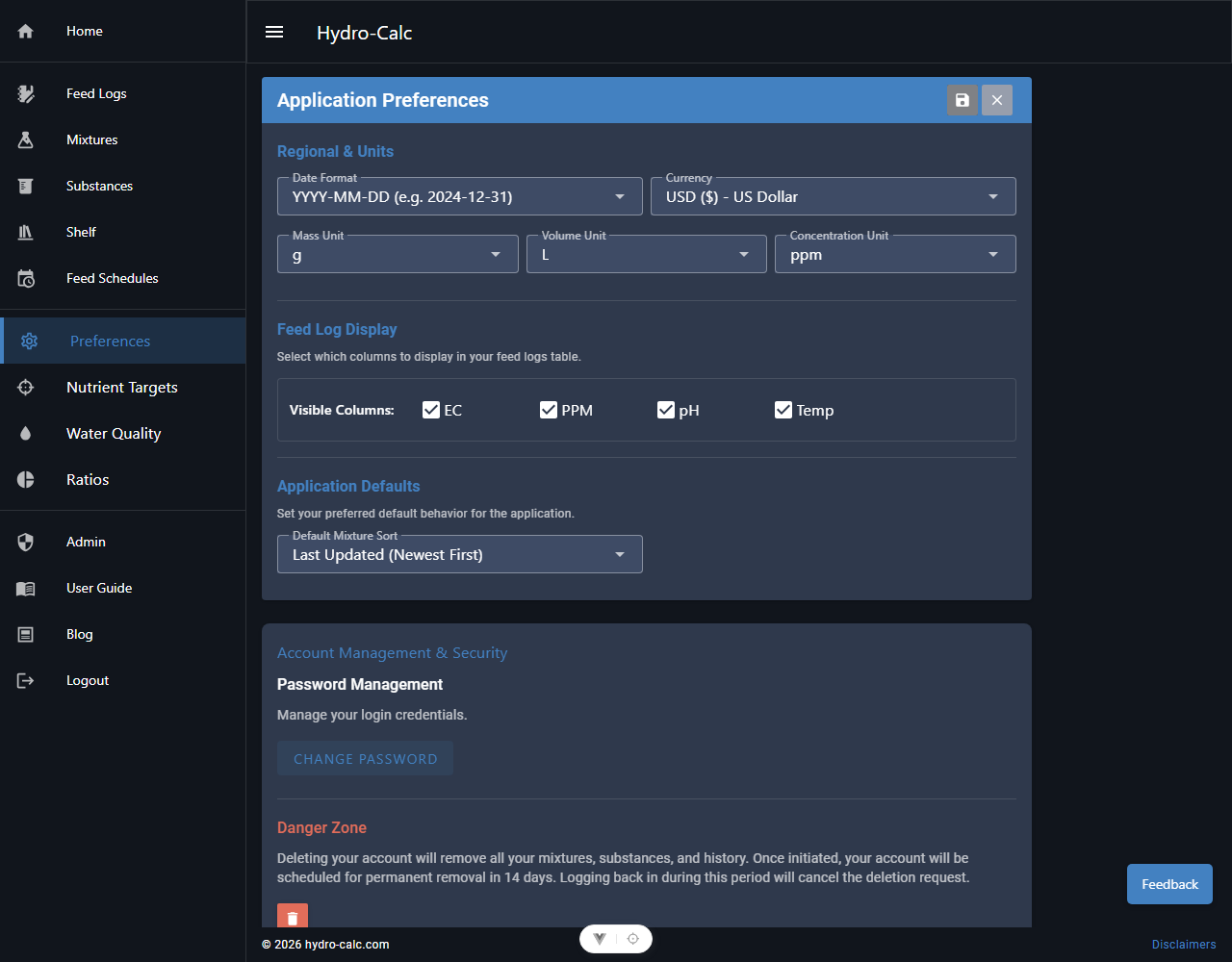
The Settings page in Hydro-Calc allows you to personalize your application experience and manage various aspects of your account and preferences.
Account Settings
This section typically includes options related to your user account:
- Change Password: Update your login password for security.
- Email Preferences: Manage notifications or marketing emails.
- Delete Account: Option to permanently delete your Hydro-Calc account and all associated data. (Use with caution!) If you choose to delete your account:
- Delete is scheduled for 30 days out.
- You're logged out immediately.
- If you log in again within 30 days, the scheduled delete will be canceled.
- If you do not log in for 30 days, your account and all associated information will be permanently deleted. There is no reversal.
Application Preferences
Customize how Hydro-Calc looks and behaves:
- Unit Preferences: Select your preferred units for:
- Currency: Choose your local currency (e.g., USD, EUR, JPY) for cost tracking. The app automatically adjusts formatting (e.g., decimals) to match.
- Mass: Grams (g), Kilograms (kg), Ounces (oz), etc.
- Volume: Liters (L), Gallons (gal), etc.
- Concentration: ppm, mM, etc. This ensures all calculations and displays are in a format you understand.
- Theme: Choose between light and dark mode, or other visual themes if available.
- Language: Select your preferred language for the application interface.